The problem
Which tool sits in which pot is tracked on a whiteboard taped to the machine, and it is always one setup out of date.
What it does
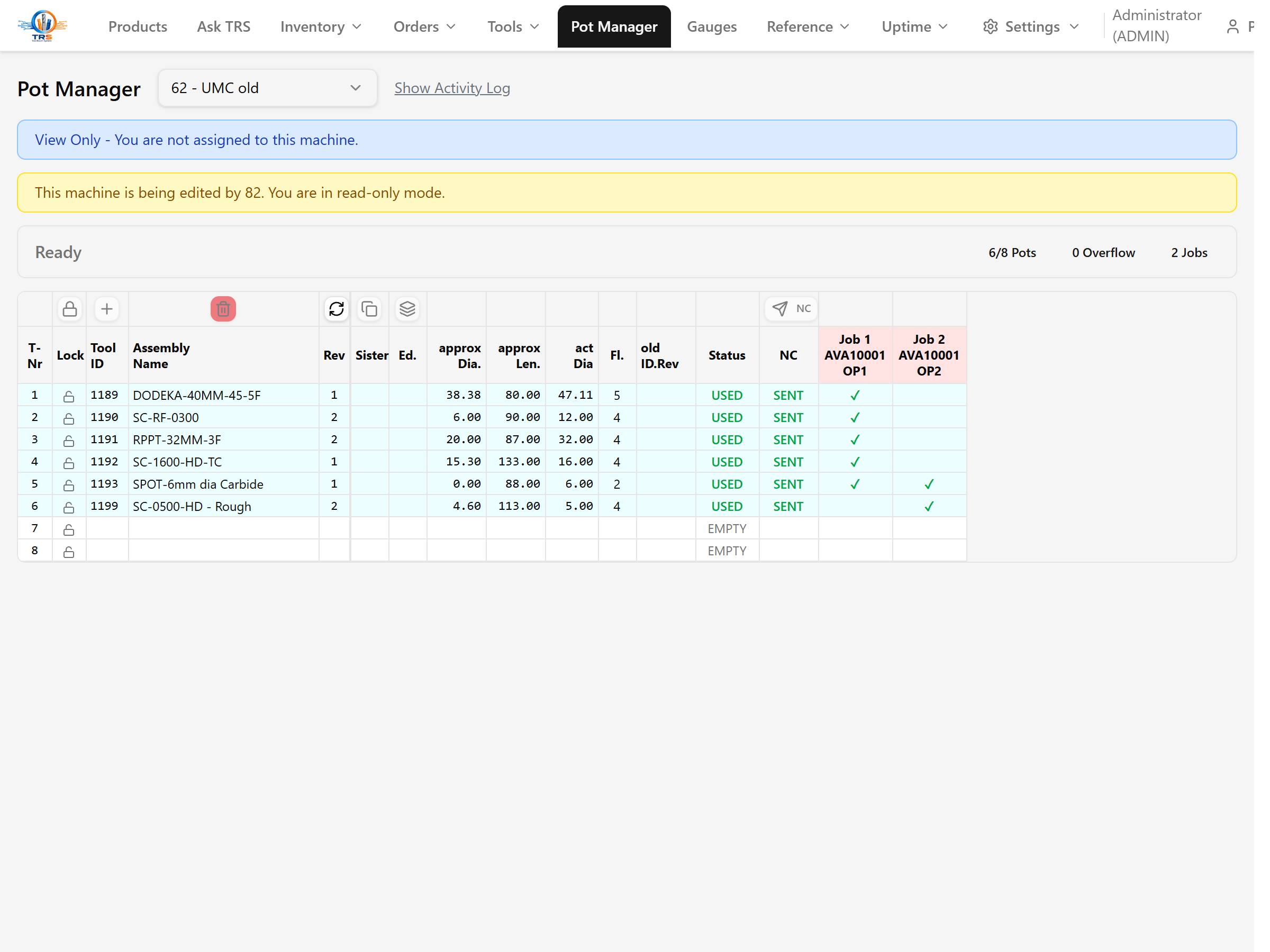
- Per-machine pot map
- Conflict detection when a tool is double-booked
- Visual layout with drag-and-drop reassignment
- A history trail of every change
Who it's for
Setters and machine operators.
In the demo: Pot 7 has a 12 mm endmill. Reassign it, and watch the conflict warning if you double-book a pot.
Works with
Needs CAM.
Common questions
What does it replace?
A whiteboard or a printed sheet taped to the machine, showing which tool is in which pot.
Who is it for, and do I actually need it?
Setters and machine operators. You need it if a setter ever rebuilds a tool that was already loaded in the spindle, or double-books a pot.
Does it need another module?
Yes. Pot Manager builds on CAM, since it maps your real assemblies to machine pots.
How does it make the rest of TRS better?
It closes the loop between the tool library and the machine: TRS knows the assembly, and now it knows which pot it is in, on which machine, right now. Reuse what is loaded, skip the rebuild, and catch a double-booked pot before it bites.
We only run a few machines. Worth it?
If a setter has ever rebuilt a tool that was already in the magazine, the reuse alone saves setup time on every job.